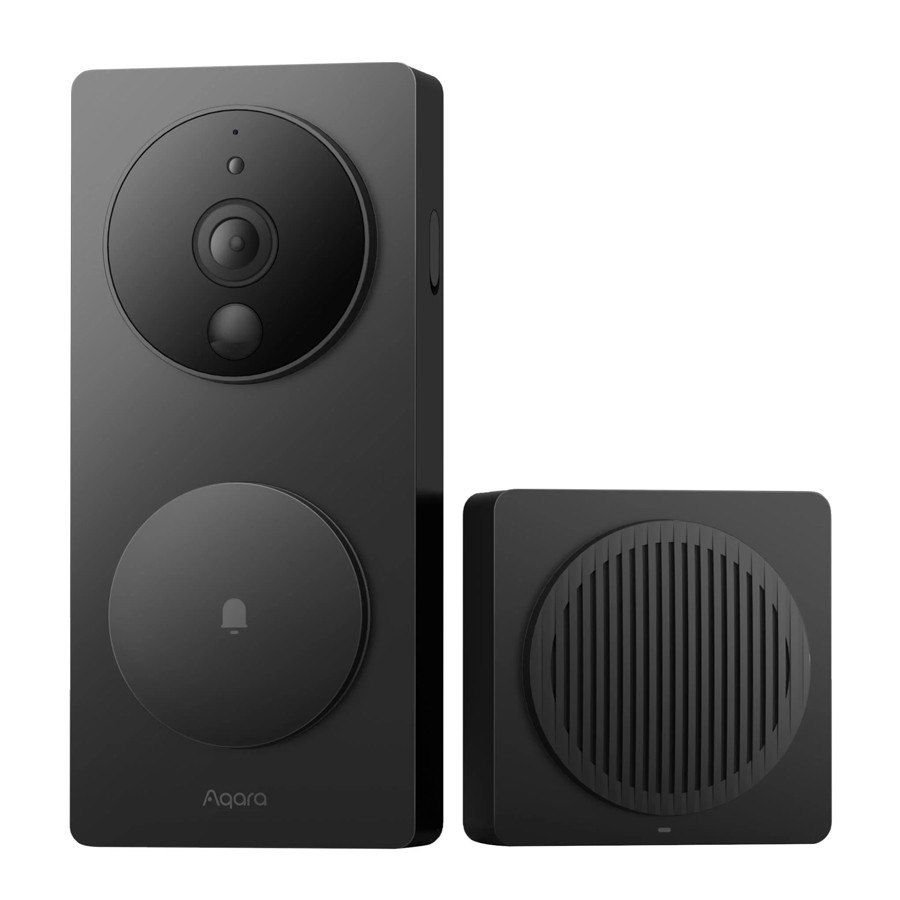
- A video doorbell lets someone see and speak to a visitor without opening the door, from a phone, tablet or smart display.
- It helps with unwanted callers, missed deliveries, slow walks to the door and peace of mind for family.
- It only works if the person can use the screen or phone, and the Wi-Fi reaches the door.
- Privacy, passwords and power are the three things people forget. Plan them first.
For someone who lives alone, the front door is both a link to the world and a source of worry. Who is that? Is it safe to open? Can I get there in time? What if I cannot walk quickly, or the person has gone before I arrive? A knock at the door at the wrong moment can mean a missed carer, a stranger who should not be there or a stressful scramble across the house.
A video doorbell addresses much of this. This guide explains how it works, how to choose one and how to set it up so it helps rather than frustrates.
The person who lives there should lead. Family members can help with setup and access, but a device that a person does not understand or want is unlikely to be used.
What a video doorbell does
A camera, a speaker, a microphone and a button, built into one unit by the door. When a visitor presses the button, or when the camera detects movement, the system sends an alert. The person can then look at the live view and speak to the visitor, on a phone, a tablet or sometimes a smart display or TV. Some units record clips and store them for later viewing.
Four problems it can ease
Cold callers, door-to-door sellers and people with bad intentions can put someone under pressure at the door. Being able to see and speak without opening the door gives the person control, and the option not to answer.
If it takes a long time to reach the front door, a video doorbell lets the person answer from where they are, a chair or bed, and tell the visitor "I am coming" or "please leave it there".
See when a delivery arrives, or when a carer or visitor has turned up. Combine with a smart lock to let trusted people in remotely, though that needs careful thought. See our guide to keyless entry for homes with support workers.
Family can be given access to alerts or the live view, so they know visitors are arriving, with the person's agreement. Some people like this. Others find it intrusive. Ask.
Types: wired, battery and plug-in
| Power | How it works | Good for | Think about |
|---|---|---|---|
| Wired | Connects to existing doorbell wiring or a low-voltage supply | Always on, no battery to charge | May need an electrician if wiring is missing or old |
| Battery | A rechargeable battery inside the doorbell | Easy to fit, no wiring, ideal in rentals | Batteries need recharging, which someone must do |
| Plug-in or mains adaptor | A power supply fitted to a nearby point | Good compromise where wiring is not available | Cable runs and neat finishing matter |
Features worth caring about
- Clear picture, day and night. Good night vision is essential. Check the field of view, so people at the edge of the porch or the step are visible.
- Two-way audio that works. Clear speaking and hearing, with minimal delay, for someone who may have hearing loss.
- A chime inside. A plug-in chime, a smart speaker or a visual signal, because a phone alert is not enough if the phone is in another room. For people with hearing loss, visual or vibrating alerts help.
- Motion zones. Adjust where the camera looks for movement, so it does not constantly alert from the street.
- Local storage or cloud? Some store clips on a card or hub. Others use a paid cloud subscription. Check running costs and where the data goes.
- Easy to use. A simple app with large buttons, or a dedicated screen at home.
Choosing by the person, not by the box
- Ask what the person wants
Is the main problem scams, time to the door, deliveries or reassurance for family? The answer shapes the choice.
- Check how they will see it
A phone, tablet, smart display or screen. Is it easy to see and use, with the hands and eyesight they have?
- Check the door and the Wi-Fi
Is there a strong Wi-Fi signal at the door? Is there somewhere to mount it at a sensible height?
- Decide how it is powered
Wired, battery or plug-in, and who will charge or maintain it.
- Set it up together
Install, test, practise answering and ignoring, and set up family access if the person agrees.
- Review after a month
What works, what is annoying, what has changed?
Privacy and the law: what to check
Cameras raise real legal and ethical questions, and NSW has laws on surveillance devices and on recording private conversations. This is general information only, and the details are complex, so check the current rules.
- Audio. Recording private conversations without consent can be an offence in NSW. A doorbell that records audio of people on your doorstep is different from recording a private conversation, but the rules are not simple. If you are unsure, check the NSW legislation on surveillance devices or seek advice.
- Neighbours. A camera pointed at a neighbour's window or yard can cause disputes and may raise legal issues. Aim the camera at your own entry, and use privacy zones to block out areas you do not need.
- Visitors and workers. If carers, support workers or tradespeople come to the door, tell them there is a camera. It is good practice and helps trust.
- Renting and strata. Ask your landlord, agent or owners corporation before fitting anything. Strata by-laws may restrict cameras at entrances.
Security: the things people forget
Secure habits
- Use a strong, unique password for the account
- Turn on two-factor authentication if it is offered
- Keep the app and the device updated
- Share access only with people you trust, and review the list
- Know where recordings are stored and how long they are kept
Common slips
- Reuse a password from another account
- Leave the default password or settings
- Give access to anyone who asks
- Forget about the account when a family member moves on
- Ignore update notices
A word on scams
A doorbell camera can help someone avoid pressure at the door, but it does not make people safe by itself. Consider a few other habits.
- Agree a simple rule: if you were not expecting the person and they want to come in, do not open the door.
- Ask for ID and call the company to confirm, using a number you find yourself.
- Put a "no cold callers" sign at the door if the person wants one.
- Tell a trusted person if you feel pressured.
Is a video doorbell right for you? A quick check
- It takes a long time to get to the door
- The person does not feel safe opening the door to strangers
- Parcels and visitors are often missed
- Family would like to know when visitors arrive
- The person can see and use a phone, tablet or screen
- There is good Wi-Fi near the front door
- The person has had cold callers or scams at the door
- The person lives alone, or alone during the day
Troubleshooting before you buy
- Wi-Fi at the door. Test the signal with a phone. If it is weak, a mesh node or extender may help.
- Existing doorbell wiring. Check the voltage and the transformer. A mismatch can cause problems.
- Mounting height and angle. Too high and you only see the tops of heads. Too low and it may be too easily reached.
- Light and glare. A bright porch light or direct sun can wash out the picture.
- Who handles alerts. If the phone belongs to the person, they must be comfortable with it. If a family member receives alerts, how will they respond?
Cost and funding
Costs include the device, any wiring or installation, a chime or screen, and possibly a monthly cloud subscription. A video doorbell is not always funded, but there may be cases where it forms part of a funded package, for instance where it is linked to a person's disability or assessed need, such as limited mobility. The OT's report should say why it is needed. See our guide on how funding works.
Myths and misunderstandings
"A video doorbell will stop all break-ins."
It can deter some and give you information, but it is one layer. Good locks, doors and habits matter more.
"It is too complicated for an older person."
Many people manage well with a simple setup, particularly when family helps at the start. The right screen and a clear routine matter.
"If I have the app, I am always being watched."
Alerts can be set to only notify for button presses, and the person can control what is recorded and who sees it.
"I will lose access if the Wi-Fi fails."
Without Wi-Fi, most doorbells lose remote features. Keep a way to know someone is at the door, such as a plug-in chime, and a manual way to open the door.
How we help
We supply and install video doorbells and intercoms, check the Wi-Fi and the mounting, set up the app and the chime, and show the person how to use it. We help with privacy settings and family access, and work with the right trade where wiring or a smart lock is involved. See our page on video intercoms and doorbells or book a free site visit.
Your first week: a simple action plan
You do not have to do everything at once. This sequence keeps things moving without overwhelm.
- Step 1
Decide what problem the doorbell should solve.
- Step 2
Test Wi-Fi at the front door.
- Step 3
Choose wired, battery or plug-in.
- Step 4
Set up the app with the person and a trusted contact.
- Step 5
Set strong passwords and two-factor sign-in.
- Step 6
Practise answering and ignoring calls.
Plain-English glossary
- Motion zone
- The part of the camera view that triggers alerts.
- Two-factor authentication
- A second check when signing in.
- Cloud storage
- Recordings kept on the provider's servers.
- Chime
- A unit inside the home that sounds when someone rings.
What happens at a Nemco site visit
If you would like a second pair of eyes, we visit the home, listen to the person first and look at the spaces they actually use. We take measurements and photos, check access for tradespeople and talk through the options in plain language, including simpler or cheaper ones where they will do the job. You then receive a written, itemised quote that your therapist, plan manager or family can read and compare. There is no obligation to proceed, and we will tell you if something is outside what we do. We also explain what each step involves for the person living there, how long the work is likely to take, whether the home can be used while it happens, and who to call if something does not work as expected after handover.
What to have ready
- Any therapist or hospital letters, or the name of the person coordinating care
- Photos or a rough sketch of the rooms involved
- A list of the times of day the person finds things hardest
- Landlord, strata or owner details if the home is not owned
- Your funding pathway, if you know it, or the name of the plan manager
When to bring in a professional sooner
If the person has had a recent fall, a change in health, a hospital stay or a new diagnosis, or if you are unsure whether a change is safe, speak to an occupational therapist or doctor before making changes. A quick conversation early can save money and avoid doing the wrong thing.
Questions to talk through at home
- Does the person want family to see the alerts?
- Who can view recordings?
- What if the Wi-Fi drops?
- Is the landlord or strata aware?
Last checked: November 2026. Rules, prices and program details change, so confirm with the source before you act. Surveillance and privacy laws are complex. Seek advice for your situation before recording audio or filming areas outside your property.
Common questions
Do I need Wi-Fi for a video doorbell?
Most need a Wi-Fi connection for alerts and live view. A strong signal at the door matters. A chime inside the house helps if the phone is not nearby.
Is it legal to record audio?
Recording private conversations without consent can be an offence in NSW. Check the current rules or seek advice before enabling audio recording.
Can family see the live view?
If the person agrees, access can be shared. Review who has access from time to time.
Will it work in a rental?
Battery or plug-in models can often be fitted without wiring. Ask your landlord or agent first.
Does it need a subscription?
Some store recordings on a paid cloud service, others on a card or hub. Check running costs before you buy.